
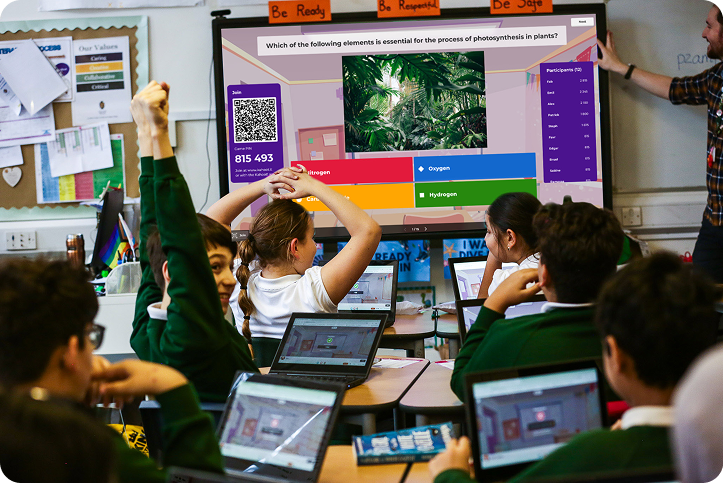
I didn’t come around on Blooket right away. A colleague kept mentioning it in the staff room and I kept nodding along without actually trying it, mostly because I’d already been burned by a couple of “engaging” ed-tech tools that turned out to be more flash than substance. Then I had a rough Thursday — kids restless, review material nobody wanted to touch — and I figured I had nothing to lose. Within a few minutes, students who normally sit quietly through everything were arguing over strategy. That’s when I stopped being skeptical.
I’ve kept using it since, and along the way I’ve picked up some adjustments that make a real difference in how well it lands with a class. None of them are complicated. Most are just about using what’s already there instead of running the default settings every time.
Switch Up Your Game Mode
Switching your game mode regularly matters more than it seems like it should. A lot of teachers settle into one mode early on — usually Gold Quest, since it’s the first thing you see — and never change it. Students notice the repetition fast, and once they know exactly what to expect, the excitement starts to fade. Gold Quest suits a quick, slightly chaotic warm-up. Tower Defense is better for something that needs actual thought instead of fast clicking. Café has a strange way of settling a rowdy room down. Battle Royale, meanwhile, tends to win over the kids who turn everything into a competition without even trying.
Don’t Build Every Question Set From Scratch
You probably don’t need to write your own question sets from scratch. I spent a lot of early evenings building sets before realizing the public library already covers most of what I need. These days I search first and only start from nothing when the material is specific enough that nothing else fits. When I do write questions myself, I keep them short — anything that takes more than a few seconds to read slows down the whole game, and the pace is really what makes it work.

Manage Power-Ups Based on Your Class
Power-ups are worth keeping an eye on, since different classes handle them differently. Some groups get so focused on the power-up mechanics that answering correctly becomes secondary — kids will answer wrong on purpose just to trigger one. If that’s happening, switch a few off before starting; you have full control over which ones are active. Other classes need the opposite adjustment. If the energy’s dragging, leaving power-ups on gives them something extra to think about and tends to bring the room back to life.
Use Team Mode More Often
Team mode doesn’t get used nearly as often as it should. Blooket defaults to solo play, but putting students into teams changes the entire dynamic. Stronger students start helping the ones who are behind, not because you told them to, but because everyone’s score is now tied together. I lean on this the day before a test especially — students who normally check out start paying attention because their team is counting on them.
Actually Check the Reports
The reports are the part almost nobody bothers with, which is unfortunate, because they’re arguably the most useful thing Blooket offers. After a game finishes, it shows exactly which questions gave the class the most trouble. That’s specific, immediate information about what needs to be retaught, and it takes barely any time to check. Treating Blooket as pure entertainment and skipping the reports means missing the part that actually helps your teaching.
Set a Timer on Questions
A timer keeps games from dragging. Without one, things tend to slow down, especially with younger students or a class that loses focus easily. Somewhere around 20 to 30 seconds per question keeps the energy up and discourages kids from quietly searching for answers instead of trying to recall them.
Don’t Underestimate the Blooks
The Blooks matter more than you’d guess. Those small collectible avatars are a bigger deal to students than I expected — some genuinely compete to unlock the rarer ones. Leaning into that a little, letting kids show off what they’ve collected or offering a small non-grade reward for consistent participation, builds motivation that has nothing to do with the material but keeps them engaged anyway.
Run a Tournament Now and Then
A tournament every so often is worth the setup if you want a noticeable spike in energy. Run it across a few periods, or across grade levels if other teachers want in. Put the leaderboard somewhere visible. Something about beating a specific other class gets even the quietest students invested.
Try Homework Mode
Homework mode exists, and hardly anyone uses it. Students can work through a set independently outside class, which is a solid fit for pre-test review or extra practice for kids who need it — and it hands you individual performance data without any grading on your part.
Go Short and Frequent Instead of Long and Rare
Frequent short sessions beat the occasional marathon one, most of the time. Rather than banking on one big review day before a test, try weaving in five or ten minutes two or three times a week. Small, low-stakes rounds of practice tend to stick better than a single late cram session, and it keeps Blooket feeling like a normal rhythm of the class instead of a rare occasion that loses its spark the more you lean on it.
Final Thoughts
None of this requires extra prep or new tools. It’s mostly about noticing what’s already sitting inside the platform. Rotate your modes, actually check the reports, try teams for a week, and don’t be afraid to make a small deal out of the Blooks and leaderboards. Pick two or three of these for your next class and see what happens — you’ll likely notice the shift before the first round even wraps up.
discaimer
This article reflects personal classroom experience and opinions only. Blooket.blog is not affiliated with, endorsed by, or officially connected to Blooket or its parent company. All product names, logos, and trademarks mentioned are the property of their respective owners. Results may vary by classroom, grade level, and subject.