You know the moment. Five minutes till class, projector’s already humming, and Blooket just told you — again — that your password’s wrong.
It’s not a huge problem in the grand scheme of things, but it sure feels like one right then. Here’s the thing though — Blooket login issues almost always come down to the same handful of causes. Once you spot the pattern, most of these get fixed in under a minute. Not a whole class period wasted. Below: logging in the right way, resetting a password you forgot, and the specific errors that seem to trip up almost everyone at some point.
Wait — Do You Even Need an Account?
Quick check first. Just joining a game your teacher already started? Skip the login entirely. Go to play.blooket.com, type in the code, pick a nickname, done. No email. No password. No wondering why nothing’s working.
Where an account actually matters is if you want to:
- Keep your Blooks and market items saved between games
- Track your XP or level as it builds up
- Host your own game (teachers, this is a must)
- Build or tweak your own question sets
Not what you’re after right now? Skip ahead to the game code page. Otherwise, let’s get you logged in properly.
Logging In Without the Headache
Most of the trouble here isn’t really about Blooket — it’s about ending up on the wrong page, or forgetting which way you signed up the first time.
Go to blooket.com. Not play.blooket.com — that one’s strictly for game codes, no login button anywhere on it, and people burn a solid five minutes hunting for one before figuring that out.
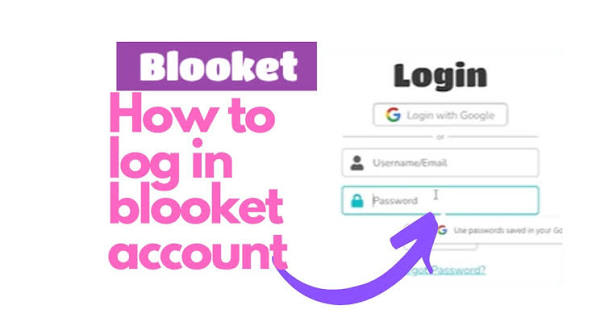
From the real homepage, hit Login, top right. Then pick your method: email and password, or Google. This is where most people get stuck without realizing it. They sign up with Google, forget that’s what they did, and then spend twenty minutes trying to reset a password that was never created in the first place.
Type in your credentials, hit submit, and you should land on your dashboard — your Blooks, your hosting tools, whatever sets you’ve made, all sitting there waiting.
One more thing — if your school set things up through Clever or Google Classroom, there’s a separate button for that on the login screen. Whatever got you in the first time, use that same one going forward. Hopping between methods is basically how people lock themselves out later.
Forgot Your Password? Here’s What Actually Works
This is the most common reason people can’t get into their account, full stop. It’s also the easiest one to fix, as long as you don’t try to just guess your way back in.
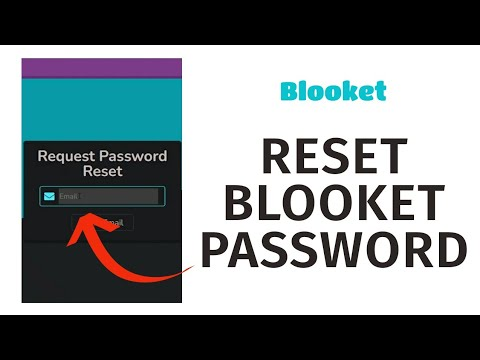
First, click “Forgot Password?” — it sits right under the password field, easy to miss if you’re not looking for it. Type in the email tied to your account, and type it carefully. A single typo here is probably the number one reason people swear the reset email never showed up. It did show up. It just went to a slightly wrong address.
Check your inbox. Not there in a minute or two? Don’t panic yet — spam folder first. Found it? Click through, set a new password, and actually pick one you’ll remember, not a rehash of something you’re using somewhere else already.
Head back to the login page, sign in with the new password, and you’re done.
If you’ve checked everywhere and there’s genuinely no email at all, there’s a decent chance your account was created through Google to begin with. In that case there’s no separate Blooket password floating around to reset — just log in with the Google button instead.
The Errors People Run Into Most
Not every login failure is about a forgotten password. Here’s what’s usually behind the rest of them.
“Invalid Email or Password.” Don’t assume the worst right away — check the obvious stuff first. Caps Lock on? Happens more than people admit. Extra space before or after the email? Also common. And double-check you’re not typing a password into a Google-login account that never had one to begin with.
The page just freezes, or it won’t load at all. This is usually more about your connection than your account. Give it a minute and refresh — Blooket gets hit with a lot of traffic during school hours, especially right around first period. Clear the cache and cookies. Try a private or incognito window too — sometimes a browser extension is quietly getting in the way for no obvious reason at all. And if you’re on a school network specifically, it’s worth testing on mobile data for a second — a surprising number of “broken login” reports actually turn out to be a school firewall quietly blocking part of the site.
Your account seems locked. After a handful of failed login attempts, Blooket will sometimes lock things temporarily as a security measure. If that happens, wait fifteen to thirty minutes before trying again, and use the password reset process rather than guessing more — repeated wrong attempts tend to make the lockout worse, not better. If it’s still locked well past that window, that’s the point where it makes sense to reach out to Blooket support directly.
You’re logged in, but nothing looks right. Missing tools, an unfamiliar layout — this usually means you’re on the wrong type of account. Teacher accounts and student accounts look pretty different from each other, and if you’ve ever created more than one account under the same email, it’s an easy thing to mix up.
A Few Habits That’ll Save You Next Time
Use a password manager if you don’t already. It sounds like overkill until the first time it saves you from exactly this situation.
Pick one sign-in method and stick with it forever. Bouncing between Google and a regular password is behind more “forgotten” passwords than anything else on this list.
Bookmark blooket.com directly, so you’re never a misclick away from ending up on the game-code page by accident.
And if your account email is a school address, keep an eye on when it expires. Update your Blooket account with a personal email before that happens — otherwise a future password reset becomes a lot more complicated than it needs to be.
If You’re Still Stuck
If you’ve gone through everything here and you’re still locked out, your best move is contacting Blooket’s support team directly through their site. Some problems — a mismatched email, a corrupted account link — really do need an actual person to sort out, and that’s exactly what support is there for.
Most people never get that far, though. Between the password reset and the fixes above, the vast majority of login problems clear up in a couple of minutes — which, if you timed it right, still leaves you enough time to get the game started before anyone in the room notices anything was ever wrong.
Disclaimer
This guide is independently written and is not officially affiliated with, endorsed by, or sponsored by Blooket. All product names, logos, and trademarks are property of their respective owners. Steps and screenshots reflect the platform at the time of writing and may change if Blooket updates its site.