

Every few weeks, someone asks me the same thing: “Should I just pay for Blooket Plus?” Usually they’ve just seen the upgrade prompt for the tenth time and started wondering if they’re missing out.
The honest answer is that most people aren’t. But some people really are, and the difference comes down to how you use the site. So let me walk through both plans and you can decide for yourself.
What the free plan already does
Blooket’s free version is far better than it needs to be. You can build question sets, host live games, and hand out solo or homework modes without paying anything. The game modes that kids love, like Gold Quest, Tower Defense, and Cafe, are all unlocked. Students type in a code, answer questions, and spend their winnings on silly little strategy moves. That’s the whole charm. It feels like a game that happens to contain a quiz, not the other way around.
You also get basic score reports after each match, a huge public library of sets from other teachers, and the option to copy and edit those sets for your own class. If you only run Blooket now and then, say as a review game before a test or a reward on Friday, you can do all of that without ever opening your wallet.
Free does come with limits. There’s a cap on how many players can join one game (it’s commonly cited as 60, though check the site for the current number), and some of the organizing and reporting tools are locked. That’s where Plus comes in.
What Plus actually changes
Plus raises the player cap to 300 and adds advanced reports, audio questions, folders, set duplication, and early access to events. That list reads like a feature sheet, so let me translate it into what you’d notice day to day. tooldirectory
The player cap is the easiest one to understand. If you teach one class of 25 kids, you will never feel it. If you run a game across several sections, or you organize a grade-wide review session, you’ll hit the free limit fast, and 300 seats solves that.
Reports are the part I’d think hardest about. The free plan gives you basic scores, while Plus gives you question-level analytics and history. A leaderboard tells you who won. Question-level data tells you that 70 percent of the room missed number 6. Those are very different pieces of information, and only one of them helps you decide what to reteach tomorrow. tooldirectory
Folders sound dull until you’ve got a few hundred sets sitting in one long list. Then they feel like a small miracle. Audio questions are a nice fit for language classes and anyone who wants students to respond to something they hear. Early access to new events is more of a bonus than a reason to buy.
What it costs
Always check Blooket’s own pricing page before you commit, because numbers move around. At the time of writing, though, several sources agree on the setup. Plus runs $4.99 a month when billed annually, which comes to $59.88 a year, while Plus Flex is $9.99 a month for people who want to pay month by month. Both give you the same features. Only the billing differs. nibble-app
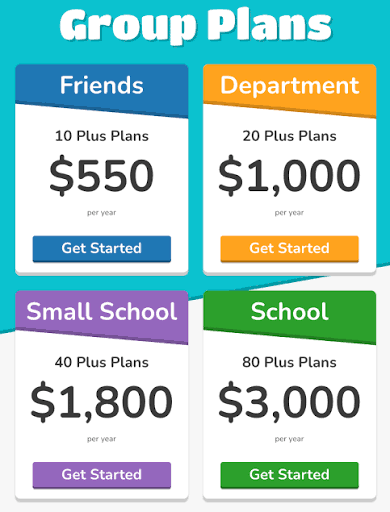
You may see lower prices on some third-party sites, around $2.99 a month, so don’t be surprised if what you find doesn’t match perfectly. If you work at a school, it’s worth asking whether the school can pay. Group bundles exist, starting around $550 a year for ten teachers. That’s a much easier conversation to have than paying out of your own pocket. tooldirectory
One small thing about Flex. It costs double per month, so it only makes sense as a trial. If you try it for a semester and love it, switch to the annual plan. If you already know you’ll use it all year, skip Flex and go straight to annual.
Free and Plus, quickly compared
FreePlusLive gamesYesYesSolo and homework modesYesYesPlayer capLowerUp to 300ReportsBasic scoresQuestion-level data and historyFoldersNoYesAudio questionsNoYesPrice$0About $59.88 a year, or $9.99 monthly
Who should stay free
If Blooket is a once-in-a-while treat in your classroom, stay put. Same if your class sizes are normal and you care more about getting kids excited than about analyzing data. Same if you’re happy grabbing public sets and don’t mind scrolling a bit to find them.
For you, Plus would be a subscription for features you’d rarely touch. Nobody needs that.
Who should upgrade
Upgrade if you teach multiple sections or run bigger events. Upgrade if you want real data on which questions trip students up, and you’d use that data to shape your next lesson. Upgrade if you’ve built a library so big that finding anything has become a chore. And upgrade if you teach languages or anything else where audio helps.
If two or more of those fit, the price is small for what you get. It’s also on the cheap side next to comparable tools. Blooket Plus costs less than a number of similar educational products at the entry level. nibble-app

A simple test before you pay
You don’t need to guess. Use the free version for a few weeks and pay attention to what annoys you. Did you wish you could see which questions the class struggled with? Did you lose a set in a messy pile? Did a game ever fill up? If you can point to one or two of those moments, you’ve found your reason. If you can’t think of a single thing you missed, you have your answer too.
And if you do upgrade, try the monthly option first so you aren’t locked into a full year. Take a quick look at the cancellation and refund rules on Blooket’s site before you pay, so there are no surprises.

How it compares to Kahoot
People often ask how this stacks up against Kahoot. On price, Blooket holds up well. Kahoot’s lower paid tiers land somewhere between $36 and $72 a year, and its bigger plan costs $230 a year. But price isn’t the whole story. Kahoot is built around a live quiz with a leaderboard, while Blooket puts the questions inside strategy games where students spend what they earn. If your students already love Blooket, that feeling is worth more than a few dollars either way. triviamakertooldirectory
So, is it worth it?
For most teachers, no, not yet. The free plan is good, and I’d never tell anyone to pay just because a button asks them to.
But if you’ve outgrown free, you’ll know. You’ll want the reports, or the bigger player cap, or a way to tame your library. At that point Plus is a fair deal, and a few dollars a month is easy to justify.
If you’re still unsure, stay on free. Nothing you build disappears, and you can upgrade the same day you decide you need to.

Disclaimer:
Blooket.blog is an independent website and is not affiliated with, endorsed by, or sponsored by Blooket LLC. Prices, features, and player limits mentioned in this article may change over time, so please check Blooket’s official website for the most current information before making a purchase. This article is for general informational purposes only and reflects the writer’s opinion etc.

Pingback: blooket.blog Blooket Free vs Blooket Plus: Is It Worth It?
Pingback: blooket.blog Blooket not loading on school Chromebook