Most Blooket games don’t fall flat because of the game mode. They fall flat because of the questions. I’ve seen a room go from loud and happy to glassy-eyed in about two minutes, just because the set was a wall of “define this word” with four boring options. So let’s fix that, and then deal with the other thing everyone asks about: getting your old Quizlet sets into Blooket without retyping the lot.
Flip your vocabulary. Instead of always showing the word and asking for the meaning, show the definition and make players hunt for the word. Or write a sentence with a gap in it. Mix the two styles inside one set, because the moment questions get predictable, people stop reading them and just tap.
Hide a mistake. Write a statement with one error in it and offer four versions, only one of which fixes it properly. This is great for grammar, math working, and science explanations. Kids can’t skim these. They have to actually read, which is the whole reason you’re running a review game anyway.
Keep exit sets short. Eight to ten questions tied to that day’s lesson, played in the last few minutes. The results show you which question the room bombed, and that’s tomorrow’s warm-up sorted.
Sneak in pop culture. A history question dressed up as a reality show plot, or a physics problem set inside a video game. You don’t need to do it every time. One silly question every four or five is enough to wake people up.
Build a difficulty curve. Open with three easy ones so nobody feels lost on question one, climb through the middle, then finish with a couple of hard ones. In modes where players can steal or swap points, those last questions feel like big moments instead of punishment.
Use pictures. Blooket lets you add images to questions, so use that. Label a diagram, spot a landmark, read a graph, name a painting. Some things are just easier to show than to explain in text.
Play outside the classroom. Family game night, a team icebreaker, a club meeting. Sets like “guess the decade,” “famous landmarks,” or “things only locals know” work nicely, and the stakes are nice and low.
Split big units into small sets. One set called “Unit 5” is hard to use. Three smaller ones (formulas, vocab, word problems) let students aim at what they’re weak on, and you can reuse them in different combinations.
Let students write the questions. Ask each student for five, then merge them all. People play harder when their own question might pop up. It also exposes who really understands the material, because writing a convincing wrong answer is surprisingly difficult.
Run seasonal sets. First week back, spirit week, the last Friday before break. Not academically heavy, but they make the class a place kids want to come back to.
Small habits that make questions better
Keep each question to two lines at most, since Blooket moves fast and long text gets ignored. Make the wrong answers believable, because one silly option turns a four-choice question into a coin flip. Skip “all of the above.” Set your timer for your slowest reader rather than your fastest. And aim for somewhere between fifteen and twenty-five questions per set, which suits most modes.
Importing a set from Quizlet
If your terms and definitions already live in Quizlet, there’s no reason to rebuild them by hand. Blooket’s set editor has an import option that takes text pasted from a Quizlet export. Both sites tweak their layouts now and then, so a button might be named slightly differently from what I describe here.
1. Open the Quizlet set. Log in and go to the set you want to move. It’s easiest if it’s your own.
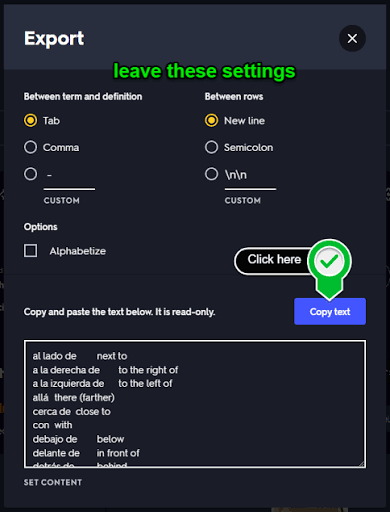
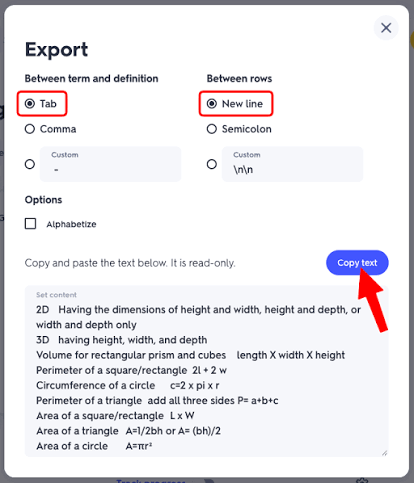
2. Export it. Find the three-dot menu on the set page and look for Export. You’ll get plain text, with each term and definition separated by a tab and each pair on its own line. Don’t change those defaults, since Blooket expects them. Copy everything.
A warning here: Quizlet has changed what free accounts can export more than once. If you can’t find the option, the set might be restricted, or you may need to try from the account that owns it.
3. Start a new Blooket set. Sign in, go to your dashboard, and create a set. Give it a proper title now, because “Untitled Set 14” is a pain to find later.
4. Hit import. In the editor, look for something like “Import from Quizlet.” A box opens for pasting.
5. Paste and read the preview. Blooket will turn each pair into a question and answer. Before you save, scan it. Did each line become its own question? Are the definitions sitting in the right slot? Did any long ones get chopped or merged together?
6. Add wrong answers. This is the part people forget. Quizlet only gives you pairs, but Blooket wants multiple choice. You can write fresh distractors yourself, which gives the best quality, or borrow other definitions from the same set as decoys, which is quicker.
7. Test it. Run a quick solo game before you use it with a real group. Two minutes now beats finding a broken question in front of thirty students.
When the import goes wrong
Everything ended up in one giant question. The separators probably got lost when you copied. Go back to Quizlet and make sure there’s a tab between term and definition and a line break between pairs.
Strange symbols appeared. Accents, math notation, and special characters often break on copy and paste. Fix them manually afterward.
There’s no import button. The interface changes occasionally, so check the editor’s menu. If it’s truly gone, Blooket also accepts a CSV template. Fill it in with Google Sheets or Excel and upload that instead.
The questions are far too long. Quizlet definitions are often full sentences. Trim them down until they can be read in a few seconds.
Some questions show up twice. If the original set had repeated terms, delete the extras before your game does it for you.
Is importing always the smart move?
Not really, or at least not on its own. Quizlet sets are built for flashcards, and a flashcard isn’t the same as a good game question. A plain term-and-definition pair is fine for basic vocabulary, but if you want students thinking harder, you’ll need to rewrite some of them as scenarios, comparisons, or “which of these is true” prompts.
What works for me is treating the import as raw material. Let it save you the typing, then put your real effort into the handful of questions that matter most. And if you’re borrowing someone else’s public Quizlet set, skim it before you use it. Public sets contain errors, and you don’t want to reward the wrong answer at game speed.
Where to start
Pick one idea from the list above. Build ten questions. Run them with your group this week and watch what happens. One real game will teach you more than a month of planning the perfect set.
Before you publish: I can’t promise 0% on any AI detector. They disagree with each other and flag plenty of human writing. The best fix is to make it yours: swap in a real moment from your own classroom or experience, change phrases that don’t sound like you, and cut anything you wouldn’t say out loud. I wrote this to read more naturally, but your own examples will do more than any rewrite can. I can also save it as a Word or Markdown file if you’d like.
Disclaimer:
Blooket.blog is an independent resource and is not affiliated with, endorsed by, or sponsored by Blooket, Inc. or Quizlet, Inc. Blooket and Quizlet are trademarks of their respective owners. Features, buttons, and import options may change over time, so the steps in this guide may differ slightly from what you see on screen. Always check the official Blooket and Quizlet help pages for the latest instructions.


Pingback: blooket.blog Classroom Rights and Tools: What Every Student and Teacher Should Know